
Desktop app
Settings and system
Configure the AgentKit Desktop app, manage the local analytics index, read local usage limits and insights, design a status line, send feedback, and migrate providers.
The System group holds app-level configuration and maintenance: sending feedback, editing settings, managing the local analytics index, designing a status line, and migrating providers. After this page you will know what each surface changes and what stays local.
Screenshot provenance: the images on this page were captured from Desktop
2.5.0-beta.32 on 2026-08-01. This page describes the current Beta docs
contract independently of those images. They have not been recaptured or
visually verified against the current Desktop build, so labels and layout may
differ.
Send feedback safely
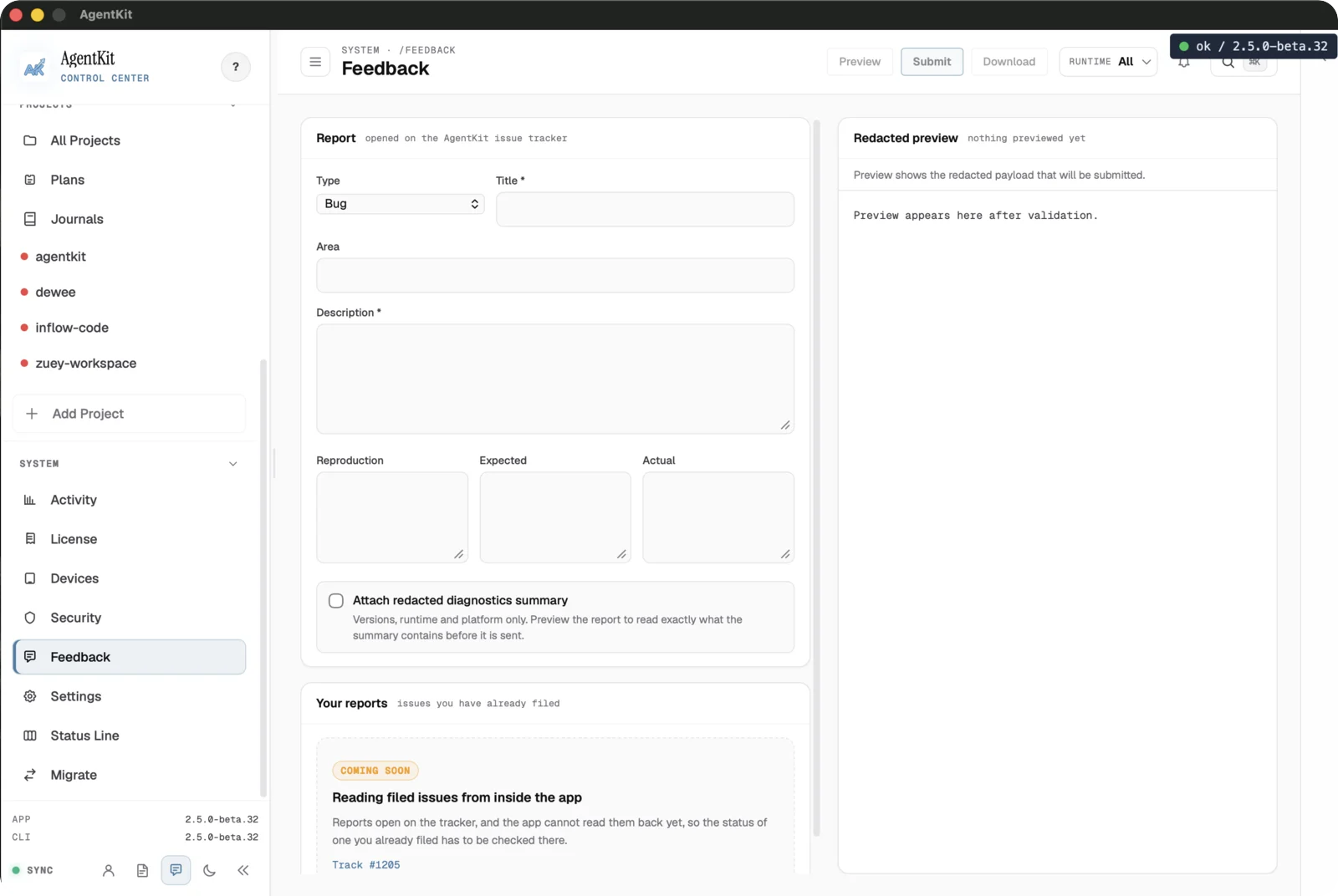
Feedback files a report in the AgentKit issue tracker. Fill in the type, title, area, and description, optionally attach a redacted diagnostics summary, and review the Redacted preview before submitting.
Feedback is sent only when you submit it. Preview the payload first, and never include a license key, session file, or unmasked config value.
Your reports lists the reports filed from this machine, including ones sent
with ak feedback. Each row shows the issue's
current state, read without authentication from the public GitHub API; when
that lookup fails, the row shows status unavailable.
Edit app settings
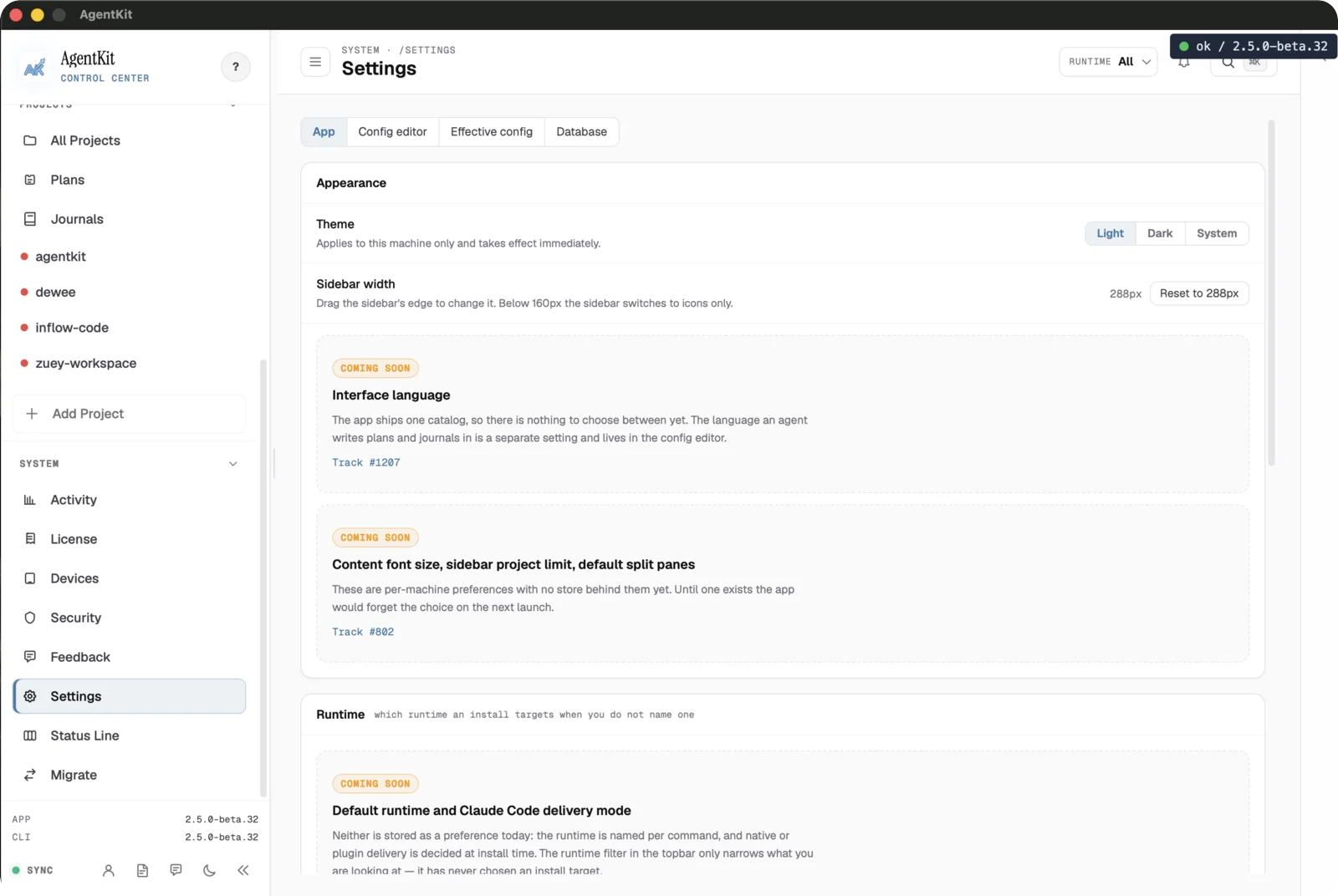
Settings holds App preferences, a config editor, effective-config inspection, and the database tab. App preferences include appearance, theme, and sidebar width, plus:
- Content font size, which scales the main content area only;
- Sidebar project limit (All, 5, 10, or 20), after which the rest of your projects collapse; the open project always stays visible;
- Default split panes, which decides whether a splittable page starts in split view when the app launches; and
- Interface language, English or Tiếng Việt (Vietnamese). Each option shows the percentage of the interface that is translated, and any text not yet translated appears in English. Until you choose, the language follows your system locale when a translation exists for it, and English otherwise.
These changes apply to this machine immediately and are remembered there. Desktop and the browser dashboard share the same translated interface. The language an agent writes plans and journals in is a separate setting in the config editor. The default runtime and Claude Code delivery mode are still marked as coming later.
Interface preferences are local Desktop state. The config editor changes AgentKit configuration, so review effective values before saving.
Manage the local analytics index
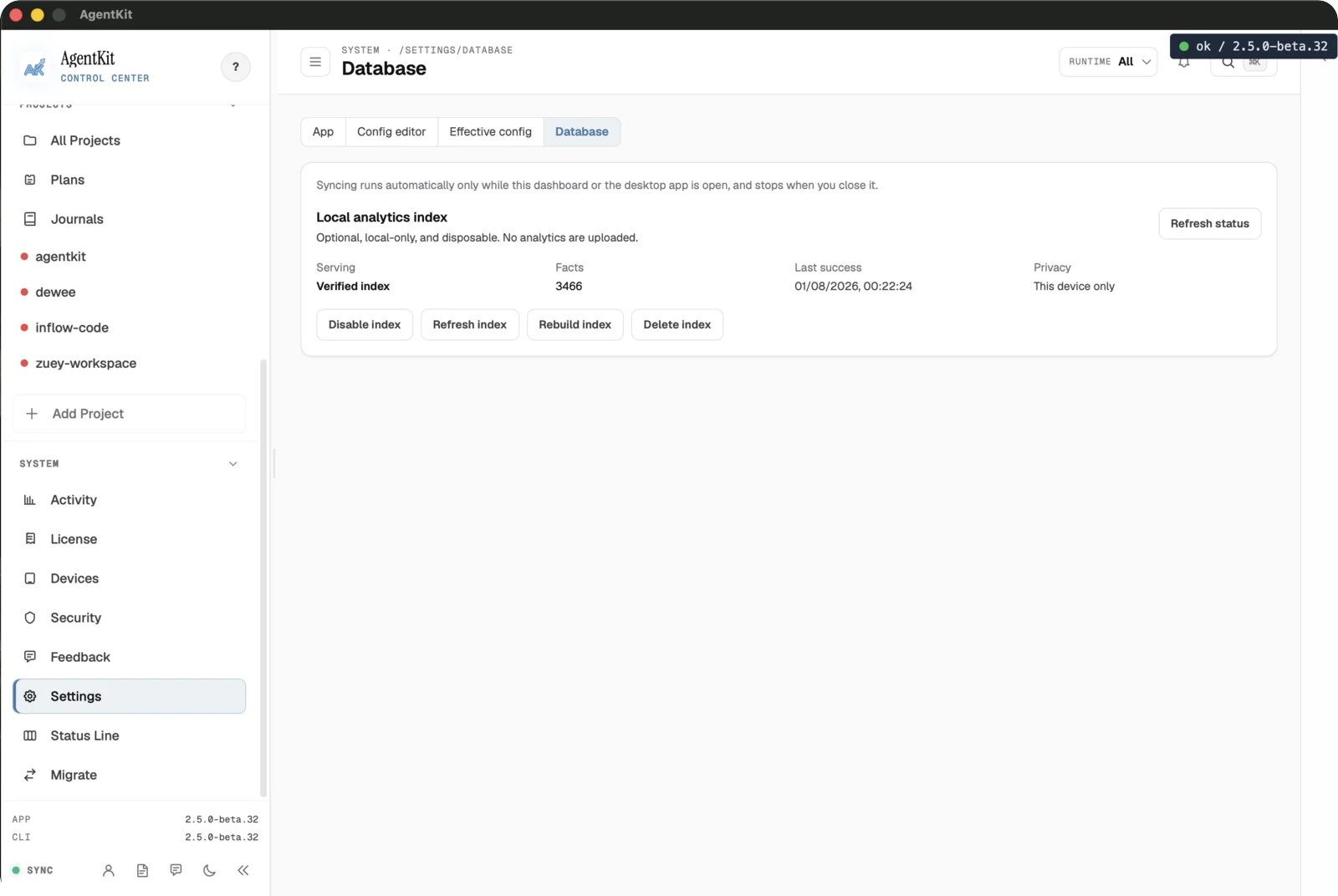
The Database tab manages the Local analytics index that backs the Dashboard. A Use local index switch turns it on or off, and Sync now brings it up to date. The collapsed Troubleshooting section holds Rebuild from scratch, which recomputes the index from supported session sources on this device, and Delete index data, which asks you to confirm, removes the index, and leaves it off until you switch it back on.
You do not need to set the index up yourself. Desktop, and the browser
dashboard, turn on an index that was never set up and rebuild one AgentKit
wrote that can no longer be read. They never override your choice: an index you
switched off or deleted stays that way. The ak CLI never turns the index on
by itself. The index is local-only and disposable — nothing is uploaded.
Read provider usage limits
The top-bar badge and popover show the same local usage-limit data as
ak usage limits and the Dashboard's Usage
limits card. Open the badge, choose a provider (claude, codex, cursor, grok,
or all), and choose a window (5h, week, monthly, or all). Claude Code
and Codex rows are counted from the local analytics index; Cursor and Grok keep
no local transcripts, so their rows show figures only while advanced polling is
on for them.
The badge itself reads as one of four states — ok, warn, danger, or
stale. By default the popover auto-refreshes every 60 seconds and rows carry
raw_only provenance: counts read straight from the local index, with no
fabricated quota percentage. Claude Code and Codex rows also show an
approximate equivalent API cost for their tokens, based on public rates as of
the date shown; a subscription is not billed per token. The badge and popover
stay empty until the local index has counted usage; if you switched the index
off, turn it back on in the Database tab.
A cold or absent index returns zeroed windows together with an index state, so the view explains the empty state instead of showing a misleading zero. Unless you turn on advanced polling, nothing leaves this machine; rebuild the index from the Database tab when the windows look stale.
Advanced provider polling (experimental)
Advanced polling is off by default. When you turn it on, AgentKit asks each enabled provider for its own usage percentages and adds them to the same rows. The Advanced polling panel appears in Settings in every build that includes the polling code; release builds do. No environment variable is needed. A build compiled without advanced polling hides the panel, and polling cannot be turned on there.
Setting Advanced provider polling to On opens an acknowledgement dialog. Enable polling stays disabled until you tick all three statements:
- The usage endpoints are undocumented, and polling them may be against the provider's terms of service.
- The provider can change or remove the endpoints at any time, and polling then stops working without notice.
- Polling may lead the provider to rate-limit, restrict, or suspend your account.
The acknowledgement is not remembered: turning polling off and on again shows the dialog again, with every box cleared. While polling is on, the panel shows when you last acknowledged. Turning polling off takes effect immediately.
While polling is on, the panel shows a switch for each provider — Claude Code and Codex (on by default), and Cursor and Grok (off by default, because every figure they show comes from polling) — and a Refresh interval of 30 s, 60 s (default), 2 min, or 5 min. The badge, popover, and Dashboard card refresh at that interval. Between polls every surface reads the cached answer, and each provider is capped at a burst of three requests a minute.
AgentKit reuses the access token the official CLI already stored. It never requests, refreshes, or writes a token.
| Provider | Endpoint | Token lookup order |
|---|---|---|
| Claude Code | GET https://api.anthropic.com/api/oauth/usage | ANTHROPIC_OAUTH_TOKEN, then .credentials.json in CLAUDE_CONFIG_DIR or ~/.claude, then the Claude Code-credentials item in the macOS keychain |
| Codex | GET https://chatgpt.com/backend-api/wham/usage | OPENAI_SESSION_TOKEN, then auth.json in CODEX_HOME, ~/.codex, or (outside Windows) codex under XDG_CONFIG_HOME or ~/.config |
| Cursor | POST https://api2.cursor.sh/aiserver.v1.DashboardService/GetCurrentPeriodUsage (monthly window) | CURSOR_ACCESS_TOKEN, then a private copy of Cursor's state.vscdb, then the macOS keychain item |
| Grok | GET https://cli-chat-proxy.grok.com/v1/billing (weekly window) | GROK_ACCESS_TOKEN, then ~/.grok/auth.json |
On macOS, the first fetch asks you to allow access to the Claude Code keychain
item. If you deny it, Claude keeps showing local counts and polling stays on;
allow access later from Keychain Access, or set ANTHROPIC_OAUTH_TOKEN
instead.
Rows the provider answered switch to provider_reported provenance and show
the provider's used percent; the local token counts stay. Cursor and Grok rows
also show when the billing cycle renews. When a poll fails,
the rows keep their local counts and show the reason, such as a missing or
expired token, a rate limit, or an endpoint error. A provider that has answered
before keeps serving its last values, marked stale. If the provider rejects the
stored token, AgentKit switches polling off for that provider and marks it
auto-disabled; refresh the token in Claude Code or the Codex CLI, then turn the
provider back on. A build compiled without advanced polling keeps showing local
counts.
Plan detection, on by default and effective only while polling is on, labels a provider's rows with the plan the provider names in its usage response (Codex, Cursor, and Grok do; Claude does not). The card announces a detected plan rather than applying it silently.
These settings live under usage_limits in the AgentKit config
(~/.agentkit/config.yaml), including usage_limits.advanced.auto_detect_plan for plan
detection, and are shared with
ak usage limits.
Review Skill and agent insights
The Insights page reads that same local evidence store: collect bounded native sources, record outcome evaluations, compare a baseline against a candidate, and inspect the evidence behind one record. Consent for collection and sharing is explicit and separate from local evidence, and a monthly contribution is frozen and privacy-filtered on this machine so you review the payload before sending it. Leaving consent unset keeps every insight local.
Design a status line
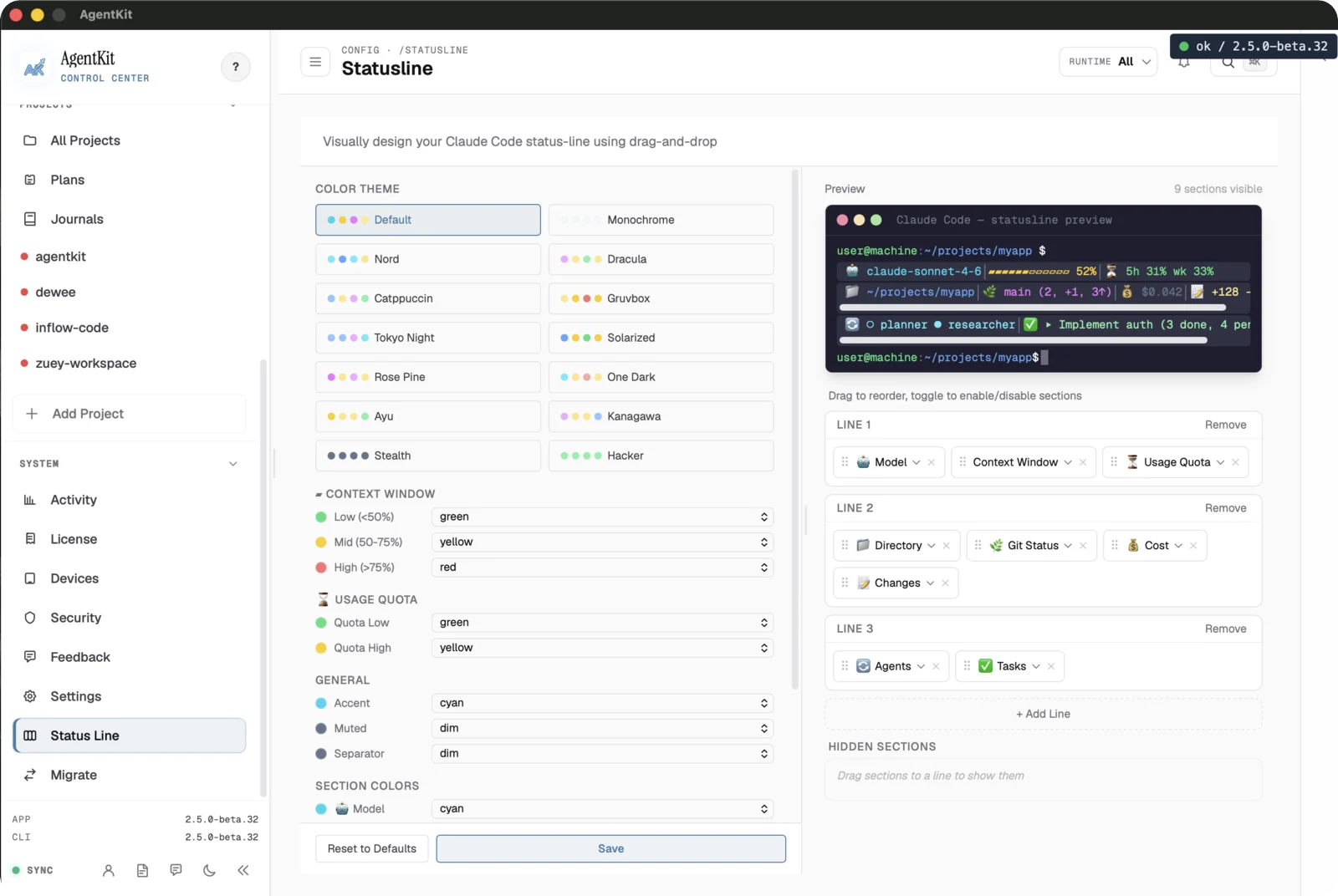
The Status Line designer builds a Claude Code status line by drag-and-drop: pick a color theme, set context-window and usage-quota thresholds, and arrange the Model, Directory, Git, Cost, and other sections across lines with a live preview. Save writes the status-line configuration.
Migrate providers
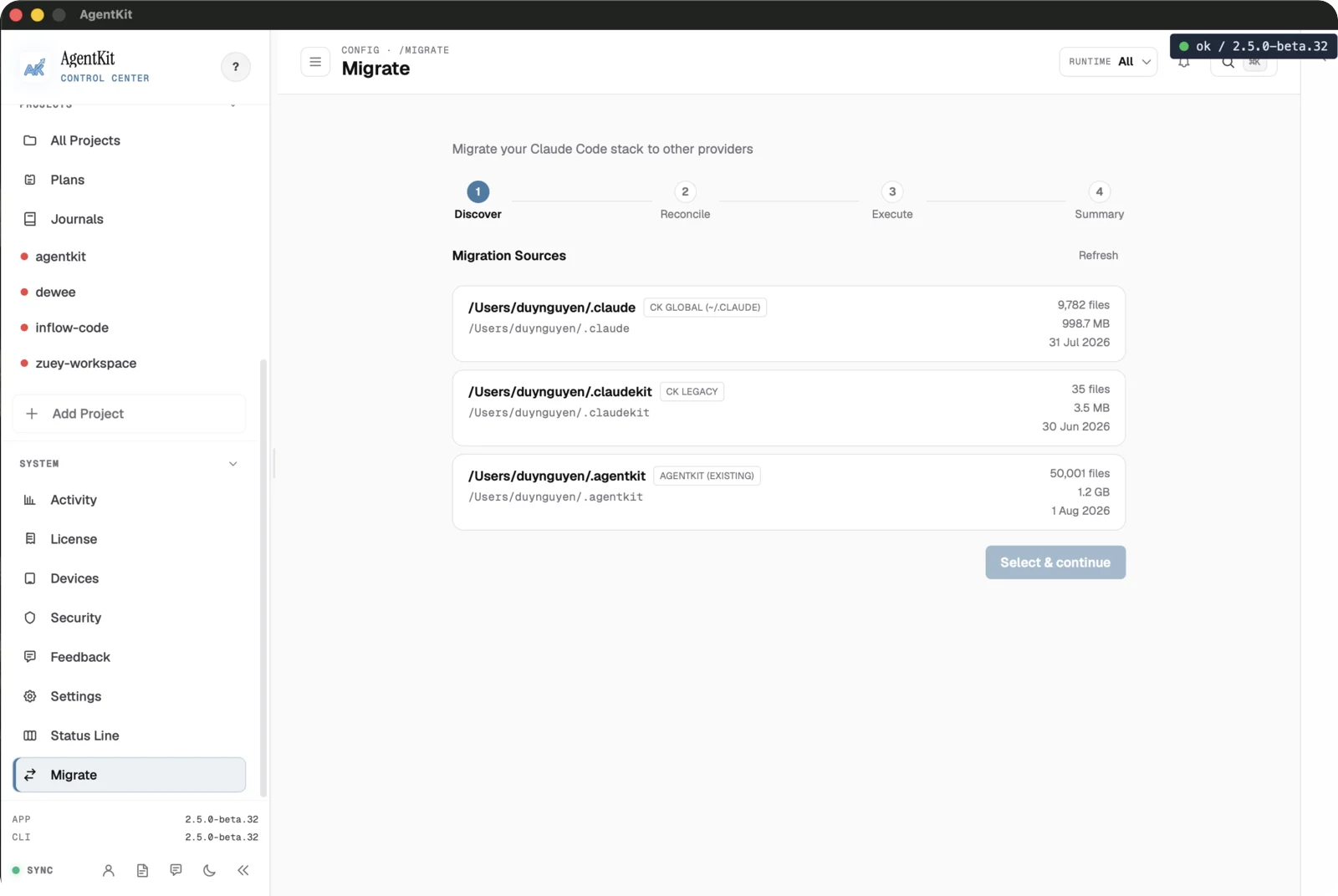
The Migrate wizard moves a Claude Code stack toward other providers across four
steps — Discover, Reconcile, Execute, and Summary. Discover lists migration
sources (such as ~/.claude, ~/.claudekit, and ~/.agentkit) with file counts
and sizes so you choose what to include.
Review each step before executing, because migration changes provider setup on this device.